
Just a year ago, Azure DevOps consulting mostly meant helping a team set up pipelines, organize their backlog, and stop shipping on Fridays. That work still matters, and most organizations still get it wrong more often than they'd like to admit. But something has shifted underneath the discipline. AI coding assistants are now writing a meaningful share of the code flowing through those pipelines, and the tooling built to manage software delivery is racing to keep up. For teams evaluating an azure devops consulting company today, the bar has moved: configuring pipelines correctly is table stakes, and the real value sits in running a delivery process that's fast, governed, and AI-aware at the same time.
That distinction has a real price tag attached to it. Organizations that treat AI-generated code with the same review and governance standards as human-written code are absorbing measurable technical debt and remediation cost within the first year of adoption, according to recent IBM Institute for Business Value research. Getting the Azure DevOps layer right, pipelines, branch policy, review gates, and access controls built around how AI actually writes and ships code now, is one of the more tractable ways to keep that cost off the balance sheet.
What Azure DevOps consulting actually covers
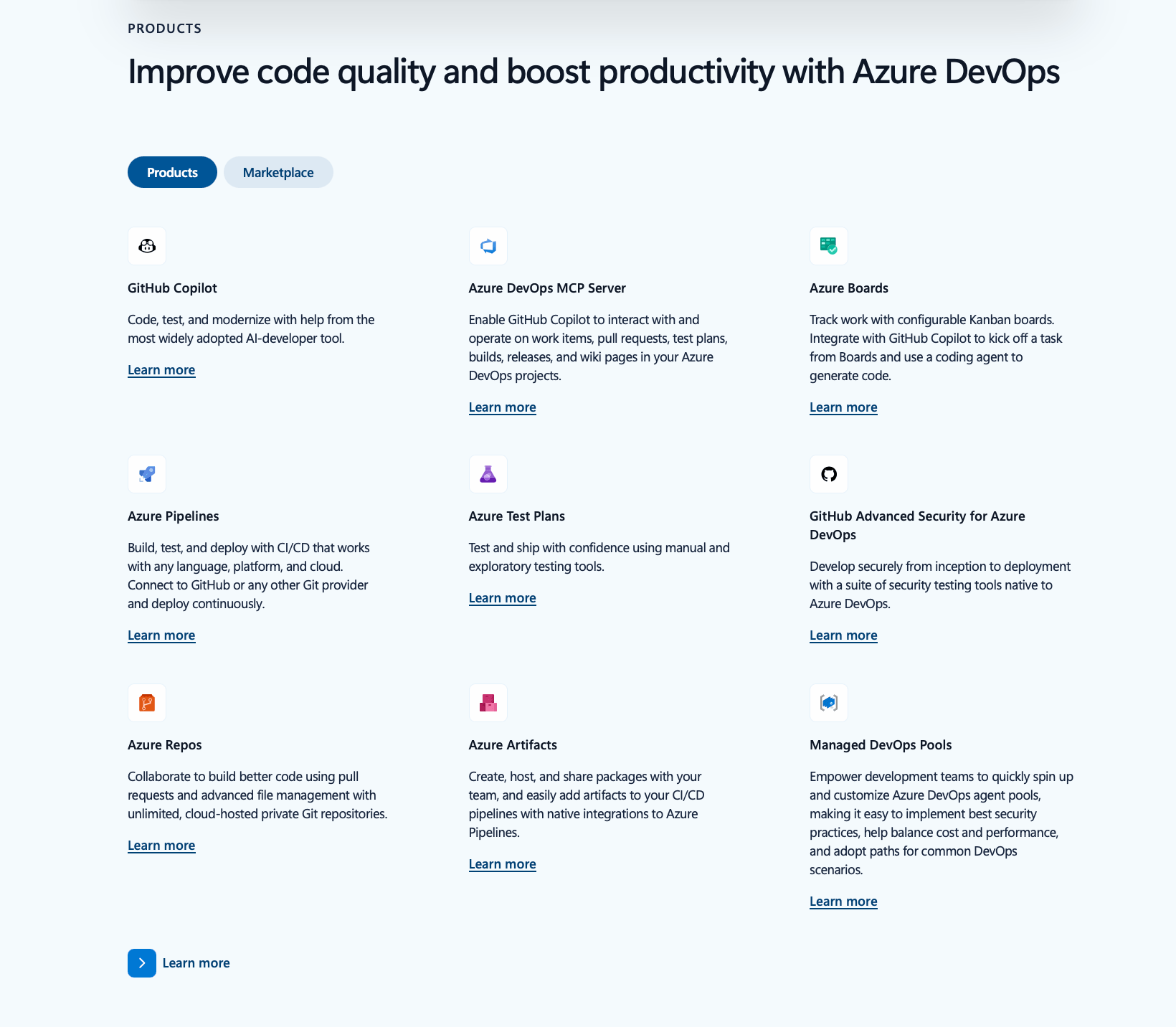
Before getting into what's changed, it's worth being precise about what Azure DevOps consulting is, because the term gets used loosely. Azure DevOps is Microsoft's suite for managing the software delivery lifecycle, and it's built around five connected services: Boards for work item tracking and sprint planning, Repos for source control, Pipelines for CI/CD, Test Plans for manual and exploratory testing, and Artifacts for package management. Individually, each is straightforward. Wired together correctly across a real organization, with real compliance requirements and real legacy systems, they're not.
That's where an Azure consulting engagement earns its keep. Most projects fall into a handful of recognizable categories, and understanding which one you actually need is the first useful thing an azure devops consulting firm should help you figure out.
- Assessment and DevOps maturity review
Before touching a single pipeline, a good partner audits your current state: how work moves from idea to production, where the bottlenecks are, what's manual that shouldn't be, and where security or compliance gaps exist. - Migration
Moving off Jenkins, GitLab, on-prem TFS, or a patchwork of scripts and cron jobs into a unified Azure DevOps environment, without breaking release cadence during the transition. - Pipeline design and YAML engineering
Building CI/CD pipelines as code, with proper branching strategy, automated testing gates, and environment-specific deployment approvals rather than a tangle of manual release steps. - Governance and security
Setting branch policies, access controls, secret management, and integrating security scanning so that "fast" and "safe" aren't in tension. - Training and enablement
Getting internal teams fluent enough that they're not dependent on the consultant six months later. - Managed services
Ongoing support for organizations that want DevOps expertise on tap without building a full internal platform team.
A serious engagement usually touches several of these at once, and the sequencing matters. Teams that jump straight to pipeline automation without first doing an honest assessment tend to automate their existing dysfunction, just faster.
Why even strong internal teams bring in Azure DevOps experts
There's a reasonable question buried in every one of these conversations: if our engineers are good, why do we need outside help? The honest answer is that depth in application development and depth in DevOps platform engineering are different skill sets, and most engineering teams are staffed for the former. Azure DevOps has enough surface area, permissions models, YAML quirks, and integration points that genuine expertise usually comes from having done dozens of these implementations across different industries, not from configuring one pipeline a year internally.
There's also a time-to-value argument that tends to get underweighted. An experienced azure devops consulting services provider has already made the mistakes your team is about to make, on someone else's dime. That's not a knock on internal engineers; it's just what specialization looks like in practice. A DevOps expert who has migrated a dozen regulated organizations onto Azure DevOps will spot a compliance gap in your branch policy in an afternoon that might otherwise surface as an audit finding eight months later.
The AI inflection point changing what "Consulting" means here
This is where the discipline looks meaningfully different than it did two years ago. AI coding tools have moved from novelty to default: JetBrains' 2025 State of Developer Ecosystem survey of over 24,500 developers found that 85% now regularly use AI tools for coding and development. Gartner's own research points in the same direction: it projects that 75% of enterprise software engineers will be using AI code assistants by 2028, reshaping day-to-day engineering work well beyond code completion. That shift changes what flows through a CI/CD pipeline, and it changes what "governance" needs to mean.
Microsoft has responded by pulling AI directly into the Azure DevOps toolchain rather than treating it as a bolt-on. GitHub Copilot code review is now available for Azure Repos, giving teams on-demand, AI-assisted pull request reviews directly inside their existing Azure DevOps workflow, without requiring a separate GitHub Copilot license to use the feature. Microsoft has also extended AI-powered vulnerability remediation into the platform: Copilot Autofix for GitHub Advanced Security is now in limited public preview for Azure DevOps, automatically analyzing CodeQL-identified vulnerabilities and generating pull requests with proposed fixes. Put together, that's a real change in what a pipeline can do on its own before a human ever looks at it.
The upside is obvious: faster reviews, faster remediation, fewer context switches for engineers who used to bounce between five tools to get a release out the door. The part that gets less attention in the marketing copy is the governance burden this creates. More AI-generated and AI-reviewed code moving through a pipeline means more code that looks correct, passes tests, and still carries risk that won't surface until later. Gartner's 2026 predictions research is blunt about this, warning that ungoverned AI coding approaches could sharply increase software defect rates, and arguing that organizations need governance, validation frameworks, and architectural controls to capture AI's productivity gains without triggering a software quality and reliability crisis. IBM's Institute for Business Value has been tracking a related pattern, and its research on the broader technical debt landscape makes the case that AI-assisted development can either resolve technical debt faster or quietly compound it, depending almost entirely on whether the surrounding process has the guardrails to catch what AI gets wrong.
Building a pipeline that ships fast is no longer the differentiator it used to be; nearly every consulting firm can do that much. What separates a strong engagement now is a pipeline that ships fast and catches the specific new failure modes AI-assisted development introduces, before they become production incidents or, worse, security findings.
Azure DevOps best practices for the AI era: What Microsoft and other big DevOPps consulting players are recommending
Strip away the marketing language, and a fairly consistent technical picture emerges from Microsoft's own engineering teams and the large consulting firms advising enterprise clients on this transition. A few practices show up repeatedly enough to count as emerging standards rather than opinions.
Move from prompt engineering to specification-driven development
Microsoft's engineering teams have been explicit about this shift: the early phase of AI-assisted development was dominated by developers experimenting with prompt phrasing to coax better output from a model, and that phase is giving way to a more disciplined approach where engineers write structured specifications defining what needs to be built, why it matters, what constraints apply, and what the acceptance criteria are. Practically, that means pipelines and work item templates in Azure Boards should be evolving to capture those specifications as structured, versioned artifacts, not just free-text tickets, so that AI agents (and human reviewers) have something precise to build against and validate output against.
Scope agents narrowly instead of relying on one general-purpose assistant
The same Microsoft guidance notes that the teams getting the most reliable output aren't pointing a single, general-purpose coding assistant at every task. They're defining task-specific agents, one that understands the team's API conventions, one focused on frontend component architecture, one scoped to infrastructure and deployment configuration, each working from shared instruction files plus task-specific context. For an Azure DevOps environment, that translates into deliberately structured repository instructions and pipeline-level agent configuration rather than a single default Copilot setup applied uniformly across every repo.
Treat agent write-access as a containment problem, not a convenience toggle
Once an AI agent has permission to open pull requests, modify infrastructure, or merge code, the operative question shifts from "does this save time" to "what stops this from doing damage." That means audit logging on every agent-initiated action, branch policies that require human approval before agent-authored changes reach protected branches, and treating personal access tokens and service connections used by agents with the same identity governance rigor as a human administrator account, not looser.
Build (or preserve) a governance layer that spans both Azure DevOps and GitHub
Microsoft's own guidance increasingly frames this as a hybrid model rather than a migration decision: GitHub carries the AI-assisted coding and agentic development experience, while Azure DevOps continues to anchor governance, compliance, and operational traceability, connected through an agent control plane that gives visibility, audit trails, and policy management across both. Consulting engagements that still frame this as an either-or choice between platforms are behind where Microsoft's own architecture guidance has already moved.
Close the governance maturity gap deliberately, not by default
This is the part organizations most often skip, and it shows up in the data. Deloitte's 2026 State of AI in the Enterprise research, based on a survey of over 3,200 senior leaders, found that only one in five companies has a mature governance model for autonomous AI agents, even as agentic AI usage is rising sharply. In practice, that gap is closed by explicit ownership: someone accountable for agent policy the way a security lead owns access policy, a defined escalation path when an agent's output fails review, and a cadence for revisiting what agents are authorized to do as the tooling itself keeps changing.
None of this replaces the fundamentals. Branch protection, environment-specific approvals, and clean YAML pipelines still matter as much as they always did.
What's changed is that "best practice" now has to account for a class of actor, the AI agent, that can write, review, and sometimes merge code faster than any human on the team, and the organizations treating that as a governance question from the start are the ones avoiding the expensive version of finding out the hard way.
What a modern Azure DevOps consulting company should bring to the table
Given all that, the bar for what counts as genuine expertise has moved. A consulting partner worth hiring in 2026 should be able to speak fluently to both halves of the problem: the platform mechanics and the AI governance layer sitting on top of them. Concretely, that means the partner should be able to:
- Configure and tune AI-assisted code review inside Azure Repos, not just flip the toggle on, but set sensible policies around when a Copilot review is advisory versus blocking.
- Integrate Copilot Autofix and similar tooling into an existing security posture without creating a false sense of coverage or duplicate, conflicting remediation paths.
- Design pipelines that treat AI-generated code as a distinct risk category, with testing depth and review requirements calibrated to that risk rather than the same rules applied uniformly across every commit.
- Define scoped, task-specific agent configurations rather than a single default assistant applied identically across every repository and team.
- Train internal teams on more than Azure DevOps mechanics, including how AI-assisted workflows change day-to-day engineering habits, especially the discipline of actually reading and understanding what an agent just proposed rather than rubber-stamping it.
Microsoft's own roadmap gives a sense of where this is heading. At Microsoft Build 2026, the DevOps-focused announcements pointed toward what the industry is now calling agentic DevOps, where AI agents handle multi-step tasks across the software delivery lifecycle rather than just suggesting the next line of code, with persistent agent memory becoming a practical requirement for production use cases like incident response. An azure devops consulting firm that isn't already thinking about agent orchestration, not just Copilot autocomplete, is going to be behind the curve within a year.
How to evaluate an Azure DevOps consulting partner
With that bar in mind, here's a practical way to screen candidates when you're comparing options.
Ask for proof of depth, beyond a services page
Request specific examples of migrations or governance builds they've done, ideally in an industry with compliance requirements similar to yours. A firm that can only speak in generalities about "streamlining your DevOps" hasn't done the harder work.
Ask directly how they handle AI-generated code in review and pipeline design
This is a good filter question because it separates consultants who've kept pace with the platform from those still selling a 2023-era engagement with a fresh coat of paint. You want a partner who can articulate a specific policy, not a vague enthusiasm for "leveraging AI."
Check whether they offer both project-based and managed-service models
Some organizations need a defined migration and then want to run things themselves; others want an ongoing relationship where the consulting firm continues to own platform health. A partner who only offers one model is optimizing for their business, not yours.
Look for security and compliance fluency, in addition to DevOps fluency
Given how much of the current risk in this space sits at the intersection of AI code generation and governance, a partner who treats security scanning as someone else's problem is a liability waiting to surface.
Ask what happens after the engagement ends
Good consulting leaves your team more capable, not more dependent. If the proposal doesn't include a clear enablement or knowledge-transfer component, that's worth pushing on before you sign anything.
Common pitfalls worth watching for
A few mistakes show up often enough to call out directly. Teams sometimes automate a broken process instead of fixing it first, which just means bad practices happen faster and with more confidence. Others adopt AI code review or autofix tooling without adjusting their actual review standards, treating a green checkmark from an AI reviewer as equivalent to human sign-off when it isn't. And some organizations still treat DevOps consulting as a one-time project rather than an evolving discipline, which was a defensible position five years ago and is a genuinely risky one now, given how quickly the underlying platform and the AI layer on top of it are both changing.
Where this leaves you
The technical foundations of Azure DevOps consulting haven't gone anywhere: Boards, Repos, Pipelines, Test Plans, and Artifacts still need to be configured well by people who've done it many times before. What's changed is the layer sitting on top of that foundation. AI is now writing and reviewing a real share of the code moving through these pipelines, and the organizations getting genuine value out of that shift are the ones treating governance as part of the build, not an afterthought bolted on once something goes wrong.
If you're weighing whether to bring in outside expertise, the clearest signal is whether your current process is actually built to catch what AI-assisted development introduces before it becomes a production problem, standing up a pipeline is the easy part by comparison. That's a harder thing to self-assess than it sounds, and it's exactly the kind of gap an experienced azure devops consulting partner is built to find.
Want a clear-eyed read on where your own pipeline stands? CIGen's Azure DevOps consulting team offers a hands-on assessment of your current CI/CD setup, governance posture, and AI-readiness, with concrete recommendations you can act on regardless of who implements them. Get in touch to schedule a consultation.