
AI use case canvas template for CTO/CIO technical review
Most AI use cases get scored or pitched before they're actually defined, leaving technical leaders debating vague ideas instead of real plans.
This AI use case canvas is a one-page technical template for documenting the architecture, data, integration points, and risk behind a single AI initiative. It's built for peer-level review between technical leaders, not for scoring a portfolio or pitching a budget.
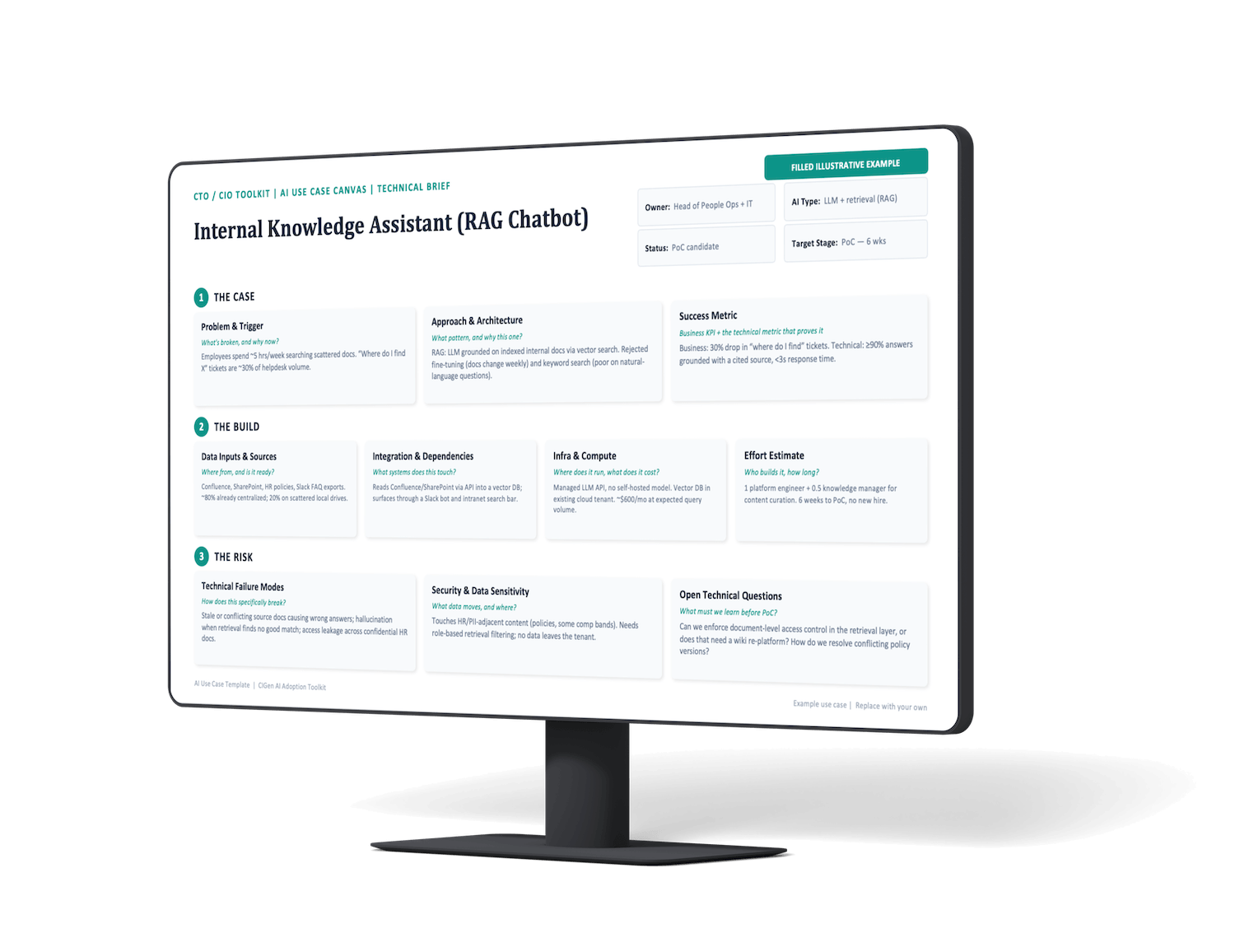
How this AI canvas template helps
technical leaders reduce risk before committing resources
Captures the technical shape of a use case, architecture, data, integration, before it's compared against other initiatives or pitched for budget.
Estimates team composition, timeline, and infrastructure cost up front, so engineering effort is sized before a single sprint is scheduled.
Documents the pattern chosen, the alternatives rejected, and how the use case can specifically fail, in language one technical leader would use with another.
Documents exactly which systems, sources, and pipelines a use case touches, so dependencies are visible before anyone commits to building it.
Names failure modes and data sensitivity up front, so technical risk surfaces before a PoC starts, not after something breaks.
Becomes the structured input for use case prioritization and the source material for a stakeholder pitch deck, instead of starting both from a blank page.
Technical clarity. Risk-awareness. Planning. AI use case canvas explained
A one-page PPT template works best when each field captures the right level of detail. Vague answers turn a technical spec into another generic AI canvas, exactly what this template is meant to avoid.
These are the nine fields that carry the most weight when completing the canvas, what each one is really asking for, and what a complete answer looks like.
State the specific event, cost, or constraint that made this use case worth pursuing right now.
Describe how the problem is handled today: manually, with rules, or not at all.
Attach a number, cost per incident, hours lost, error rate, so the trigger is concrete, not anecdotal.
Name the architecture (classical ML, fine-tuned model, RAG, agent, computer vision) rather than just "AI."
Document at least one pattern that was considered and ruled out, and why.
Explain the reasoning in terms a technical peer would accept, not a sales pitch.
State the outcome the business cares about (downtime reduction, ticket volume, revenue) in measurable terms.
State the model-level metric that proves the system works: precision, recall, latency, groundedness.
Define the number that separates a successful PoC from one that isn't ready to scale.
List every system, database, or API the use case will draw data from.
Flag whether the data is clean, structured, and available now, or needs collection and cleanup first.
Note how much historical data exists and whether it's enough to train or ground the model.
Identify what the use case reads from: source systems, data stores, or APIs.
Identify what the use case writes to or surfaces in: dashboards, ticketing tools, chat apps.
Name any team that owns a system this use case depends on.
Specify whether inference runs on existing infrastructure, a managed API, or new infrastructure.
Estimate the ongoing cost to run the solution, not just the cost to build it.
Note whether the footprint changes meaningfully between PoC, pilot, and production volume.
List the roles needed to build it, not just headcount: ML engineer, data engineer, subject-matter expert.
Give a realistic range to PoC, not a single optimistic number.
Flag if this requires skills or capacity the team doesn't currently have.
Name failure modes tied to the chosen pattern: hallucination, drift, false positives, cold-start.
Note what causes performance to decline over time: stale data, changing inputs, aging equipment.
State how the team will notice if the model starts failing in production.
Note whether the use case touches PII, confidential, or purely operational data.
Specify where data is processed and stored, and whether it leaves the existing environment.
Flag if the use case needs role-based restrictions to avoid exposing sensitive content.
Your technical use cases are getting waved through without real scrutiny?
This free one-page AI use case canvas forces the architecture, data, and risk onto the table before anyone commits budget or engineering time.
AI use case canvas: common mistakes to avoid
Most canvases fail in the same five places: architecture chosen without rationale, data assumed to be ready when it isn't, infrastructure cost left unestimated, security treated as an afterthought, and metrics that don't actually prove anything.
These five steps call out the most common mistake in each area, and what a stronger answer looks like instead.
Name the actual pattern
Classical ML, fine-tuned model, RAG, agent, or computer vision, not just "AI" or "GenAI."
Show what was rejected
Document at least one alternative considered and why it lost.
Match complexity to the problem
Don't reach for an agent or fine-tune when a simpler pattern solves it.
Verify before you claim it
Confirm data is structured, accessible, and recent enough, don't take it on faith.
Separate available from usable
Data that exists in a system isn't the same as data that's clean enough to use.
Flag the gap honestly
If data needs collection or cleanup first, say so. It changes the timeline.
Price the ongoing run, not just the build
Compute, storage, and API costs recur long after the PoC ends.
Account for scale
Estimate the footprint at pilot and production volume, not just a demo.
Choose hosting deliberately
Managed API, existing infrastructure, or new infrastructure each carry a different cost profile.
Classify the data early
Know whether PII or confidential data is involved before architecture is finalized, not after.
Decide on data residency upfront
Confirm where data is processed and whether it can leave the existing environment.
Build in access control
Plan role-based restrictions before launch, not as a fix after a near-miss.
Pick a number, not a direction
State the specific business KPI and the threshold that counts as success.
Add the technical metric too
Precision, recall, or latency targets: the number that proves the model itself works.
Set the bar before building
Agree on the success threshold before the PoC starts, not after results come in.
Where the AI use case canvas fits in CIGen's toolkits
The AI use case canvas is part of CIGen's CTO/CIO toolkit, sitting between deciding what to build and proving it works.
Each of the below tools in our toolkits addresses a different decision point, so initiatives move forward with the right depth of analysis at the right stage.
Compare many use cases to prioritize implementation.
Once a use case has a completed canvas, score it here against others on value, feasibility, and risk before committing resources.
Pitch one use case to stakeholders for budget.
Turn a completed canvas into a stakeholder narrative once it's been technically reviewed and is ready for approval.
Track them all once they are live.
Monitor the use case through PoC, pilot, and production after the canvas and pitch deck have done their job.
Using the AI use case canvas as a team
The canvas works best when it's filled in by more than one person. The goal is a shared, peer-reviewed view of the use case before it moves to scoring or pitching.
Name the person responsible for the architecture and risk answers, not just a business sponsor for the idea.
Have the technical owner and a data or infra lead fill in the case and build fields in the same sitting.
Bring technical and business stakeholders together to agree on failure modes and the threshold that defines success.
Share the completed canvas with another technical lead for a sanity check before it moves further.
Feed the finished canvas into use case prioritization or a stakeholder pitch deck, instead of starting either from scratch.

Get the AI use case canvas template
Download the free one-page use case canvas to bring CTO-level technical clarity to your next AI use case before it's scored, piloted, or pitched.


