
When organizations process data from ERP systems, SaaS platforms, manufacturing systems, IoT devices, customer applications, and on-premises databases simultaneously, the challenge is not merely to collect data, but it's more about moving, orchestrating, governing, and operationalizing it reliably at scale.
Azure Data Factory has become one of Microsoft Azure’s primary services for enterprise-grade data ingestion and orchestration. It enables organizations to build scalable pipelines that move data between cloud, hybrid, and on-premises environments with centralized monitoring and governance.
Azure Data Factory (ADF) is often positioned as the operational backbone of a modern Azure analytics platform, especially when combined with services such as Azure Synapse Analytics, Azure Databricks, and Azure Data Lake Storage.
What is data ingestion in Azure?
Data ingestion refers to the process of collecting and transferring data from multiple source systems into centralized storage or analytics platforms for reporting, AI, machine learning, or operational processing.
In Azure environments, ingestion commonly includes:
- Moving ERP and CRM data into a cloud data lake
- Synchronizing SaaS platforms with analytical systems
- Replicating operational databases into warehouses
- Streaming IoT or telemetry data
- Consolidating structured and unstructured enterprise data
ADF primarily focuses on orchestration and large-scale managed data movement rather than heavy real-time streaming. It supports both ETL and ELT approaches depending on the architecture design.
Microsoft positions ADF as a fully managed cloud integration service for building data-driven workflows.
Why organizations use Azure Data Factory for ingestion workloads
Several characteristics make ADF attractive for enterprise environments.
Broad connector ecosystem
ADF supports over 90 native connectors for:
- SQL Server
- Oracle
- SAP
- Salesforce
- REST APIs
- Amazon S3
- FTP/SFTP
- Azure services
- On-premises systems

This reduces custom integration development and simplifies hybrid-cloud modernization initiatives.
Hybrid architecture support
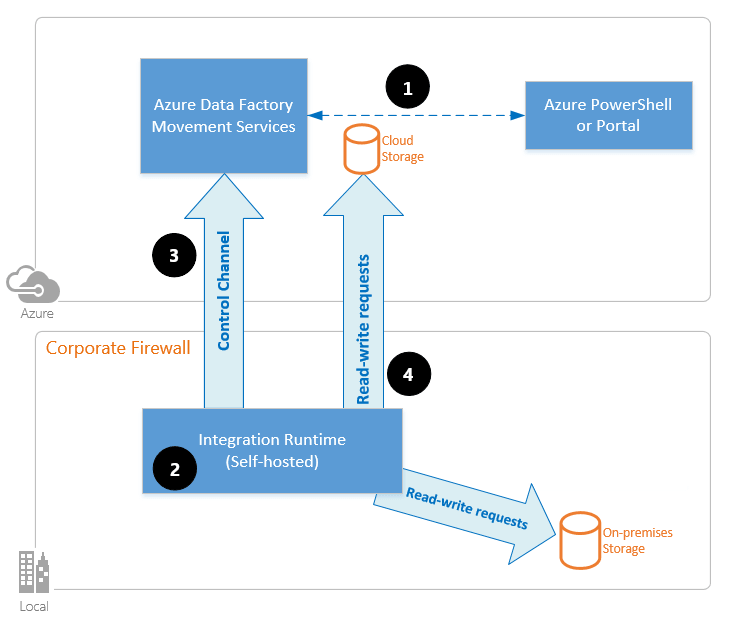
One of ADF’s major enterprise advantages is hybrid integration through the Self-hosted Integration Runtime.
This allows organizations to securely ingest data from:
- On-premises SQL servers
- Legacy ERP systems
- Private networks
- Restricted manufacturing environments
without exposing internal infrastructure publicly.
Low operational overhead
ADF is fully managed by Microsoft, meaning infrastructure patching, scaling, and availability are abstracted from engineering teams.
This becomes especially valuable for organizations modernizing fragmented integration estates previously dependent on custom SSIS servers or manually maintained ETL jobs.
Native Azure ecosystem integration
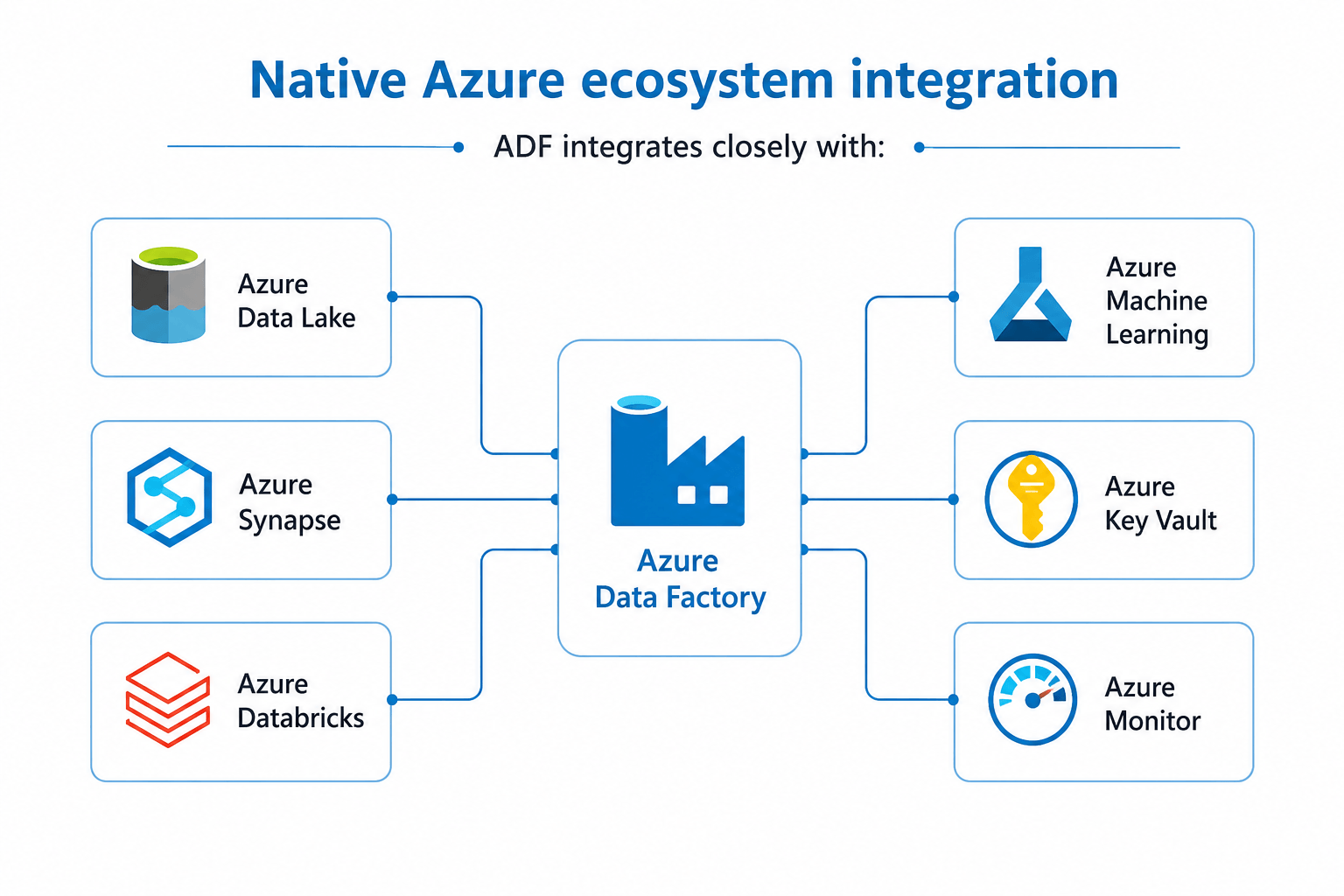
ADF integrates closely with:
- Azure Data Lake
- Azure Synapse
- Azure Databricks
- Azure Machine Learning
- Azure Key Vault
- Azure Monitor
This enables organizations to standardize ingestion and orchestration inside a broader Azure-native analytics architecture.
Core Azure Data Factory components involved in ingestion
Understanding several core ADF building blocks is important from an architectural perspective.
Pipelines
Pipelines orchestrate workflows and define execution logic.
A pipeline may include:
- Data movement
- Transformations
- Validation
- Notifications
- Conditional logic
- Scheduling
Linked services
Linked services define secure connections to source and destination systems.
Examples include:
- Azure SQL Database
- SAP
- Blob Storage
- REST APIs
- On-premises databases
Datasets
Datasets describe the structure and location of the data being processed.
Integration Runtime
Integration Runtime acts as the compute layer responsible for executing activities and moving data.
ADF supports:
- Azure Integration Runtime
- Self-hosted Integration Runtime
- SSIS Integration Runtime
This flexibility is one of the reasons ADF is commonly used in hybrid enterprise environments.
Common data ingestion patterns in ADF
Batch ingestion
The most common pattern. In this case, ADF ingests data periodically:
- Hourly
- Daily
- Weekly
- Event-triggered
Typical examples include:
- ERP exports
- Financial reporting data
- CRM synchronization
- Manufacturing production data
Incremental ingestion
Rather than copying entire datasets repeatedly, Azure Data Factory can ingest only changed records using:
- Watermarks
- Timestamps
- Change tracking
- CDC mechanisms
Incremental ingestion significantly reduces compute costs, pipeline runtime, and network utilization.
This is considered a best practice for enterprise-scale ingestion.
Metadata-driven ingestion
Larger organizations often avoid hardcoded pipelines.
Instead, metadata tables define:
- Source systems
- Load frequency
- Transformation rules
- Destination mappings
This enables reusable enterprise ingestion frameworks with lower operational complexity.
Event-driven and micro-batch ingestion
Azure Data Factory can support event-driven and near real-time ingestion scenarios through trigger-based orchestration and micro-batch processing patterns.
For example, ADF pipelines can automatically start when:
- A file lands in Azure Blob Storage
- An event is received through Azure Event Grid
- A scheduled micro-batch window begins
ADF commonly integrates with:
- Azure Event Hubs
- Azure Functions
- Azure Databricks
- Azure Stream Analytics
However, ADF itself does not process continuous real-time streams. Its role is orchestration, scheduling, and managed data movement rather than low-latency stream processing.
For true streaming architectures with millisecond-level latency requirements, organizations typically rely on dedicated streaming platforms such as:
- Azure Stream Analytics
- Apache Kafka
- Azure Event Hubs
- Spark Structured Streaming
In enterprise Azure environments, ADF is often used alongside these services to coordinate downstream ingestion, transformation, and analytics workflows.
.png)
Azure-native architecture for enterprise ingestion
A common enterprise Azure ingestion architecture typically looks like this:
Source systems → Azure Data Factory → Azure Data Lake → Synapse/Databricks → Power BI/AI models
In practice:
- ADF orchestrates ingestion
- Data Lake acts as centralized storage
- Databricks or Synapse performs transformations
- Power BI consumes curated datasets
- Azure Machine Learning consumes prepared training data
This layered architecture improves governance, scalability, auditability, cost management, separation of concerns.
Security and governance considerations
Security and governance become increasingly important once Azure Data Factory pipelines begin processing sensitive or business-critical information. In enterprise environments, ingestion workflows often handle financial transactions, healthcare records, manufacturing telemetry, customer information, and operational analytics data across multiple systems and regions.
Without proper governance controls, ingestion pipelines can introduce security gaps, inconsistent access management, limited auditability, and compliance risks. As organizations scale their Azure data platforms, security architecture should be treated as a foundational component of the ingestion strategy rather than an afterthought.
Recommended enterprise practices include:
Managed identities
Embedded credentials inside pipelines create unnecessary operational and security risks, particularly in large-scale environments with multiple developers, integrations, and deployment pipelines.
Instead, organizations should use Azure Managed Identity authentication wherever possible. Managed identities allow Azure services such as ADF to authenticate securely against other Azure resources without storing usernames, passwords, or connection secrets directly in pipeline configurations.
This approach improves credential management, security posture, secret rotation processes as well as compliance readiness.
It also reduces the likelihood of accidental credential exposure in source control repositories, deployment templates, or shared environments.
Azure Key Vault integration
Secrets, API keys, database credentials, and connection strings should be centralized inside Azure Key Vault rather than hardcoded into pipeline definitions or configuration files.
ADF integrates natively with Key Vault, allowing pipelines to retrieve sensitive information securely during runtime.
This provides several operational advantages:
- Centralized secret management
- Simplified credential rotation
- Reduced duplication across pipelines
- Improved auditability
- Better separation between development and operations teams
In enterprise environments, Key Vault integration is commonly considered a baseline security requirement rather than an optional enhancement.
RBAC and least privilege access
Azure Data Factory permissions should follow role-based access control (RBAC) principles with the minimum required access granted to users, applications, and operational teams.
Not every developer or analyst requires full administrative permissions across ingestion environments. Granular access policies help reduce accidental configuration changes and limit the potential impact of compromised accounts.
Organizations typically separate responsibilities across:
- Platform administrators
- Data engineers
- Analysts
- Operations teams
- Security teams
Applying least-privilege access controls also supports compliance initiatives and improves governance transparency across enterprise cloud environments.
Monitoring and lineage
Operational visibility is essential once ingestion pipelines scale across multiple systems, business units, and cloud services.
Integration with:
- Azure Monitor
- Log Analytics
- Microsoft Purview
helps organizations improve observability, monitoring, and governance visibility across the data platform.
These services allow teams to:
- Track pipeline activity
- Investigate failures
- Monitor performance trends
- Audit data movement
- Understand data lineage
- Support regulatory reporting requirements
Data lineage capabilities become especially valuable in enterprise analytics and AI initiatives where organizations need to understand how data moves between operational systems, transformation layers, reporting environments, and machine learning workflows.
Strong monitoring and governance practices help organizations maintain trust in the reliability, traceability, and security of enterprise data pipelines over time.
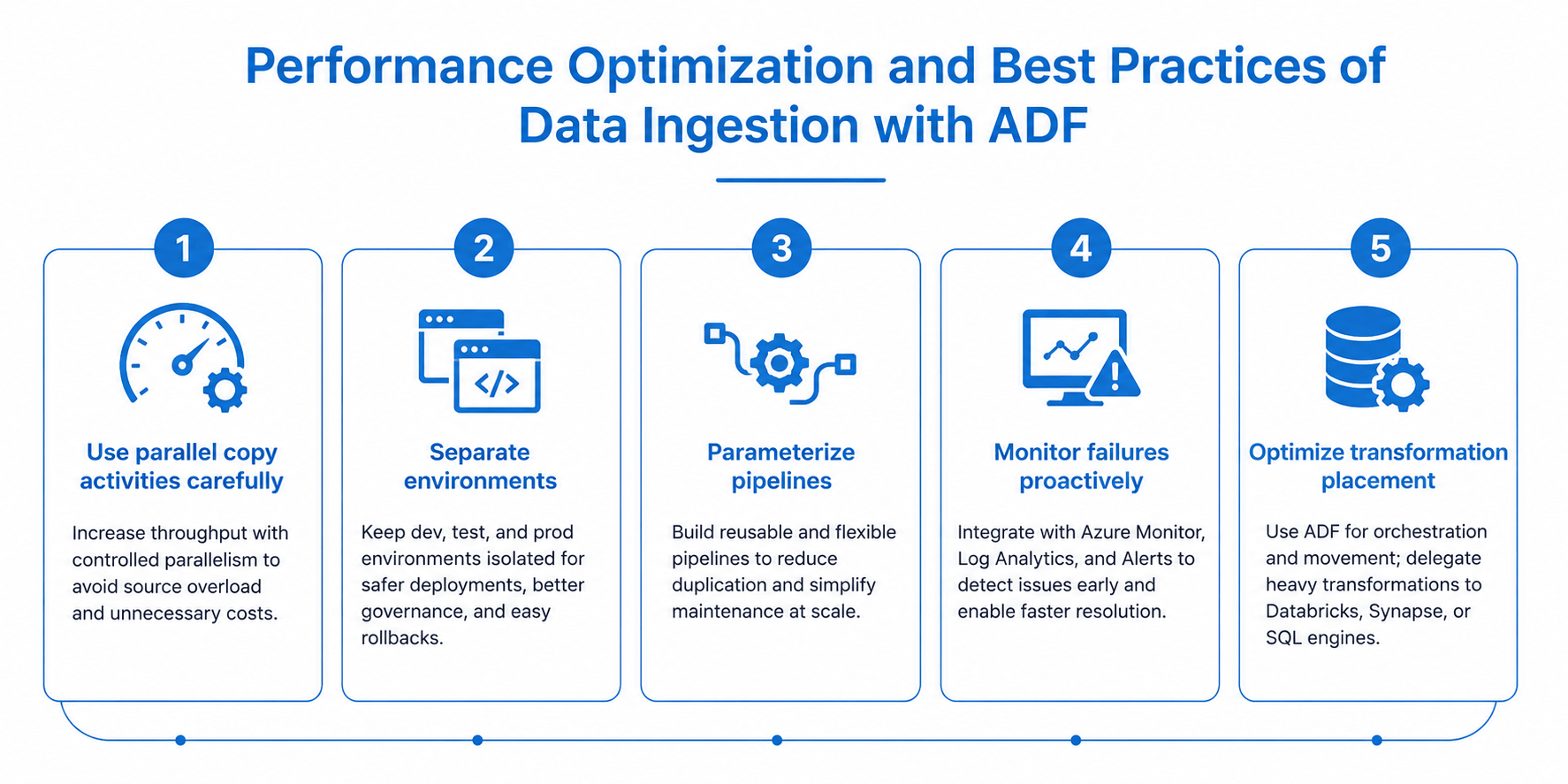
Performance optimization and operational best practices of data ingestion with ADF
Several architectural and operational practices can significantly improve the reliability, scalability, and cost-efficiency of Azure Data Factory environments. While ADF is a managed platform, enterprise-scale ingestion workloads still require careful pipeline design, monitoring strategy, and workload distribution to avoid bottlenecks and operational instability.
1. Use parallel copy activities carefully
ADF supports parallel execution for copy and transformation activities, allowing organizations to accelerate ingestion throughput across large datasets and multiple source systems. This becomes particularly valuable when ingesting data from distributed applications, regional databases, or high-volume transactional systems.
However, parallelism should be configured strategically rather than maximized by default.
Excessive concurrency may:
- Overload source databases
- Saturate network bandwidth
- Trigger API throttling limits
- Increase Integration Runtime consumption costs
- Create contention in downstream storage or analytics layers
In enterprise environments, engineering teams typically define workload-specific concurrency limits based on:
- Source system performance capacity
- Data volume characteristics
- Ingestion windows
- SLA requirements
- Cost optimization targets
For example, overnight batch ingestion pipelines may tolerate higher concurrency levels, while operational systems supporting live business transactions often require more conservative settings to avoid performance degradation.
2. Separate environments
Production, testing, and development environments should remain fully isolated within the Azure data platform architecture.
Using separate Azure Data Factory instances for each environment improves:
- Governance control
- Deployment reliability
- Security segmentation
- Change management
- Disaster recovery readiness
Environment separation also simplifies CI/CD implementation through Azure DevOps or GitHub Actions pipelines, allowing engineering teams to validate pipeline changes safely before production deployment.
To reduce configuration drift and improve operational consistency across environments, in mature enterprise setups, organizations often combine:
- Infrastructure-as-Code (IaC)
- ARM templates or Bicep
- Source-controlled pipeline definitions
- Automated deployment pipelines.
This approach becomes increasingly important in regulated industries where auditability and rollback procedures are critical.
3. Parameterize pipelines
Hardcoded pipelines quickly become difficult to maintain at scale, particularly when ingestion frameworks support dozens or hundreds of source systems.
Parameterized pipelines allow organizations to build reusable ingestion templates that dynamically adapt based on:
- Source connection details
- File paths
- Table names
- Load frequencies
- Environment variables
- Transformation rules
This reduces duplication significantly while improving maintainability and deployment speed.
For example, a single metadata-driven ingestion pipeline may support hundreds of database tables using centralized configuration files or control tables rather than requiring individually maintained pipelines for each dataset.
This design pattern is commonly used in enterprise Azure data platforms to improve scalability and reduce operational overhead.
4. Monitor pipeline failures proactively
Operational monitoring is one of the most overlooked aspects of enterprise data ingestion projects.
While the Azure Data Factory interface provides basic execution visibility, enterprise operations teams typically require centralized observability and automated incident management capabilities.
Production-grade monitoring architectures usually integrate ADF with:
- Azure Monitor
- Log Analytics
- Azure Alerts
- Microsoft Sentinel
- ServiceNow or other ITSM platforms
This allows organizations to detect failures automatically, trigger escalation workflows, monitor SLA compliance, analyze long-term pipeline performance trends, identify recurring bottlenecks and improve root cause analysis.
Monitoring should extend beyond simple pipeline success/failure states.
Advanced operational teams also track:
- Pipeline duration trends
- Data latency
- Failed row counts
- Throughput anomalies
- Integration Runtime utilization
- Cost spikes
- Retry frequency
Proactive observability becomes particularly important in multi-region or hybrid-cloud architectures where ingestion dependencies span multiple systems and network boundaries.
5. Optimize transformation placement
ADF performs exceptionally well as an orchestration and managed data movement platform. However, organizations should carefully evaluate where heavy transformations are executed within the broader Azure analytics architecture.
Although Mapping Data Flows provide built-in transformation capabilities, very large-scale processing workloads are often better handled by specialized compute engines such as:
- Azure Databricks
- Synapse Spark
- Dedicated SQL pools
- Serverless SQL engines
These platforms are generally more suitable for large-scale joins, advanced aggregations, machine learning preparation, distributed Spark processing, high-volume data enrichment, complex business logic execution.
A common enterprise anti-pattern involves placing excessive transformation complexity directly inside ADF pipelines, leading to:
- Longer execution times
- Higher operational costs
- Difficult debugging
- Reduced maintainability
Instead, many organizations use ADF primarily for scheduling, orchestration, dependency management, secure data movement, workflow coordination, while delegating compute-intensive processing to dedicated analytics services optimized for transformation workloads.
This separation of responsibilities generally improves scalability, operational transparency, and long-term platform maintainability across enterprise Azure environments.
When Azure Data Factory may not be the best fit
ADF is powerful, but not universal. Organizations may consider alternative or complementary services when:
- Millisecond-level streaming is required
- Extremely complex Spark workloads dominate
- Full SaaS analytics unification is desired
- Microsoft Fabric architecture is being prioritized
Increasingly, enterprises evaluate ADF alongside Microsoft Fabric as Microsoft expands Fabric’s unified analytics capabilities.
Still, ADF remains highly relevant for mature enterprise integration workloads, especially in hybrid-cloud environments.
Final thoughts
Azure Data Factory has evolved into a foundational orchestration and ingestion layer for many Azure-based analytics platforms. Its strength lies not only in moving data, but in enabling scalable, governable, and hybrid-ready enterprise integration architectures.
For CTOs and CIOs, the key architectural consideration is rarely whether ADF can ingest data, it is how ingestion pipelines align with broader modernization goals, governance models, AI readiness, operational maturity, and long-term cloud platform strategy.
In most enterprise Azure environments, ADF works best as part of a larger ecosystem rather than as a standalone ETL tool. When designed with proper governance, incremental loading, security controls, and metadata-driven architecture, it can support scalable analytics and AI initiatives across the organization.


.jpg)